- Home
- Users & Science
- User Guide
- Computing and Data
Computing and Data
Essential information for accessing computing resources and handling data during your visit.
You are required to have a unique personal account at the ESRF. If you do not yet have an account, you can create one through the User Portal. If you forget your password, you can reset it online.
- Single sign-on (SSO): Use your ESRF account to securely access multiple services with one login. More details can be found in the SSO dedicated page.
- Two-Factor authentication (2FA): is mandatory to access your account; setup instructions are provided in the 2FA guide.
Note: you'll need this same account to access all resources at the ESRF, including to submit proposals and to be registered as a user on an experiment, so well before your visit to the ESRF is even scheduled.
More than 180 days after your experiment, if you still need access to data or services, you can ask your local contact to request a cyber visitor account on your behalf.
- Policies: All users are required to adhere to the Charter for the use of the computing resources at the ESRF.
- Wi-Fi access:
- Eduroam: Available at ESRF, ILL, and IBS for anyone with a valid eduroam account.
- EPN_Visitors: Login with the email address registered in your ESRF user account and your user account password (in lowercase).
- EPN_Open: Available in the Auditorium and Guesthouse only, no account needed; suitable for conference attendees or other short-term visitors.
- Personal devices (laptops, tablets, smartphones) should connect using one of the networks above, in accordance with the Computing Charter referenced above.
During your experiment, all your data is automatically saved to ESRF's central storage system, no action is needed on your part. While on-site, you can access and work with your data directly, including via remote access tools. Your data remains available on central storage for a limited period after your visit (see below for details), and the Data Portal gives you long-term access to browse, download, and manage it.
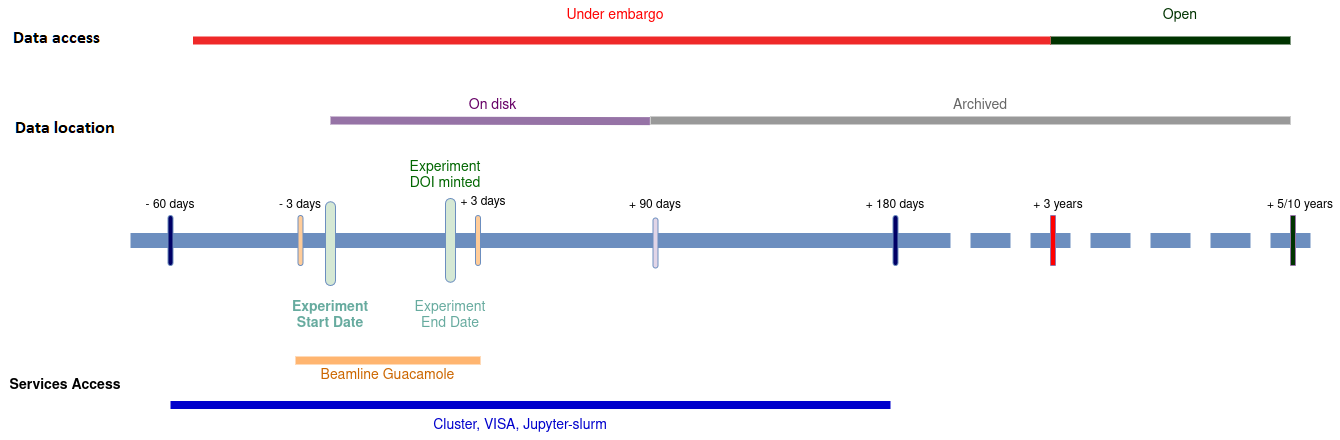
ESRF data management timelines - access to data and services.
- Data policy: The ESRF Data Policy, endorsed by the ESRF Council in 2015 and updated in 2023, governs how experimental data are managed and shared. It implements the principles of Open Science and FAIR data. Data are private to the proposal team for an embargo period of three years after the experiment, after which they are automatically made public for non-proprietary research experiments (see the Data Policy for exceptions).
- Data storage: You have access to the data of the proposals you are participating in, either as an Investigator on the proposal or as a user participating in the experiment and registered on the Session Form (A Form). The Principal Investigator (PI) can grant access to additional collaborators through the Data Portal after the experiment (see this video for how). Data remain available on central storage for 90 days after the end of the experiment, after which they are archived for long-term preservation (at least 5 years); a notification email is sent to participants approximately 7 days before archival. After this period, you can request data restoration by emailing helpdesk@esrf.fr.
- Data download: While your data is available on central storage, you can download it either via Globus (recommended) for large and reliable transfers, or manually through standard file copy tools or direct download via the Data Portal for datasets under 2 GB.
- Remote access: You can access ESRF computers remotely to monitor your experiment or analyse your data, via SSH, or the Guacamole remote desktop service.
- Data processing: Our ESRF account includes a personal Unix home directory for your files and scripts. You also have access to the ESRF Slurm cluster - a high-performance computing system for data analysis and intensive calculations - as well as tools like VISA to create virtual compute instances and Jupyter-Slurm notebooks for interactive code, text, and visualisations.
- Data citation / DOI: You must cite the DOIs of your data in publications. More information can be found here.
For detailed guidance on data handling, storage, and computing resources, please see our full documentation (accessible from the ESRF network or with ESRF login).
For any computing issue during your visit, contact helpdesk@esrf.fr.
partners


European Synchrotron Radiation Facility - 71, avenue des Martyrs, CS 40220, 38043 Grenoble Cedex 9, France.