- Home
- Users & Science
- Find a beamline
- ID23-2: Microfocus Macromolecular Crystallography
- Troubleshooting
- Crystal rotating out of the beam
Crystal rotating out of the beam
Crystal rotating out of the beam
In some cases, the Dozor plot and/or characterization results indicate improper centering of the crystal.
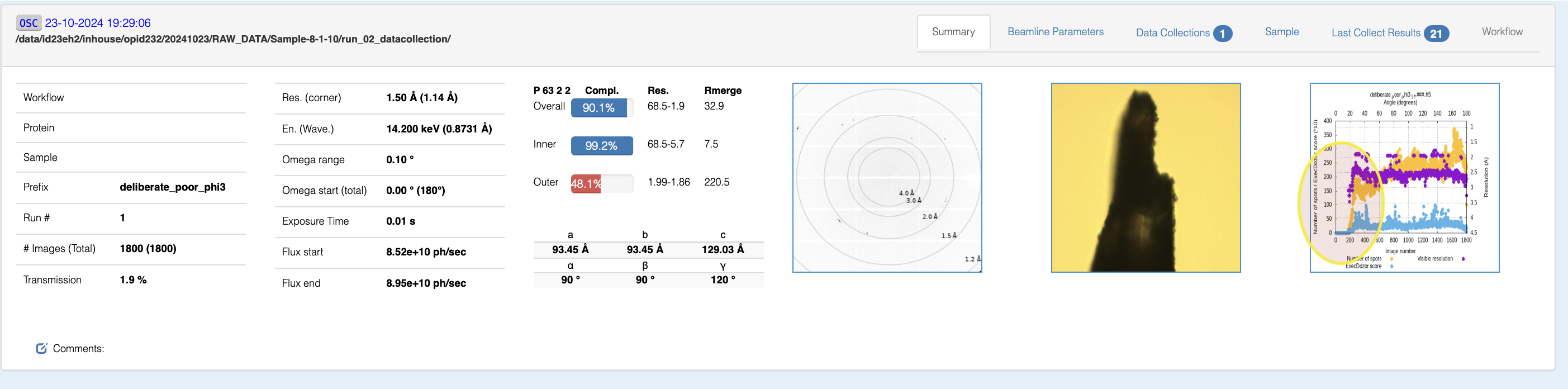
This can come from four situations:
- Crystal not centered on the rotation axis
- Anisotropic diffraction of the crystal
- Beam position not at the center of the screen
- Rotation axis miscalibrated
If you are sure that situations one and two do not apply (usually situation 1 can be ruled out y using Xray centering or MXPress workflows), you can align the beam and calibrate the rotation axis. NB: if you have a small feature that you are trying to 3-Click center on but cannot (centered position a bit to the left or right), the problem is #4.
The best solution to these problems is to calibrate the beam position on the YAG using centre beam (Beamline actions->center beam) and then calibration of the goniometer with an alignment pin. We still recommend this for very thin or small crystals, so if his is the case, make sure to confirm with your LC that this has been done. However, there is now a second option:
The workflow for centering the beam and calibrating the axis is very simple but requires a sample to be mounted:
- mount a sample (preferably one that has already been analyzed). A diffracting sample is preferable, but the process also works with an empty loop. The smaller the crystal horizontally (or part of a crystal), the better. Rotating omega to the orientation at which the sample is thinnest is recommended
- Manually center on the loop or crystal
- Run the "Calibrate Rotation Axis" workflow by right clicking in the sample view

NOTE: Two quality control checks are performed in this procedure which prevent the rotation axis position from being updated if
- The position has moved very far (currently 25 microns, but being refined)
- The correlation between the 0 and 180 degree scans is less than 80%
Both issues could be due to a poorly diffracting and or large sample, so it would be worth selecting one from the test puck (contact your local contact) or a sample you know to diffract well (2A, single lattice). What this process actually does:
- Center beam (the same as in Beamline actions->"Centre Beam" (which can and should be done independently from the use of the the calibrate_rotation_axis workflow
- Performs two large line scans 180 degrees apart
- Determines the shift (if any between them)
- Sets this alignment motor position to be the reference position in Mxcube and the Microdiff software
A video can be found here, which includes the now unnecessary step of doing a center beam beforehand (center beam has been included in the workflow as of Nov 2024). Also note that a spurious error is produced the first time the workflow is run after an mxcube server restart (the values are still updated)
partners


European Synchrotron Radiation Facility - 71, avenue des Martyrs, CS 40220, 38043 Grenoble Cedex 9, France.