 fr.esrf.tangoatk.widget.util.jdraw.JDObject
fr.esrf.tangoatk.widget.util.jdraw.JDRectangular
fr.esrf.tangoatk.widget.util.jdraw.JDAxis
fr.esrf.tangoatk.widget.util.jdraw.JDObject
fr.esrf.tangoatk.widget.util.jdraw.JDRectangular
fr.esrf.tangoatk.widget.util.jdraw.JDAxis
|
|||||||||
| PREV CLASS NEXT CLASS | FRAMES NO FRAMES | ||||||||
| SUMMARY: NESTED | FIELD | CONSTR | METHOD | DETAIL: FIELD | CONSTR | METHOD | ||||||||
java.lang.Object
public class JDAxis
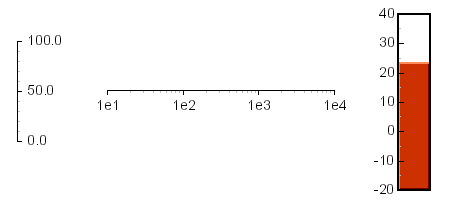
JDraw Axis graphic object. JDAxis allows to build easily sizeable gauges, it supports Font, Label format, auto labelling, and tick.
Here is an example of few JDAxis:
| Field Summary | |
|---|---|
static int |
AUTO_FORMAT
Use default compiler format to display double |
static int |
BININT_FORMAT
Display integer using binary format (%b) |
static int |
DECINT_FORMAT
Display integer using decimal format (%d) |
static int |
HEXINT_FORMAT
Display integer using haxadecimal format (%x) |
static int |
HORIZONTAL_AXIS
Horizontal axis |
static int |
LEFT_LABEL
Labels are at the left of the axis (Vertical axis only) |
static int |
LINEAR_SCALE
Linear scale |
static int |
LOG_SCALE
Logarithmic scale |
static int |
RIGHT_LABEL
Labels are at the right of the axis (Vertical axis only) |
static int |
SCIENTIFIC_FORMAT
Display value using exponential representation (x.xxEyy) |
static int |
SCIENTIFICINT_FORMAT
Display value using exponential representation (xEyy) |
static int |
TIME_FORMAT
Display number of second as HH:MM:SS |
static int |
VERTICAL_AXIS
Vertical axis |
| Constructor Summary | |
|---|---|
JDAxis(java.lang.String objectName,
       int x,
       int y,
       int w,
       int h)
Consttruc a JDAxis object. |
|
| Method Summary | |
|---|---|
JDObject |
copy(int x,
     int y)
Returns a copy of this object at the specified location. |
java.awt.Font |
getFont()
Returns the label font. |
int |
getFormat()
Returns the label format of this axis. |
int |
getLabelPos()
Returns the current label positionning policy. |
double |
getMax()
Returns the max value of this axis. |
double |
getMin()
Returns the min value of this axis. |
int |
getOrientation()
Returns the orientation of this axis. |
int |
getScale()
Returns the scale of this axis. |
int |
getTickSpacing()
Returns the current axis spacing (in pixel). |
int |
getTickWidth()
Returns the current axis tick width. |
boolean |
hasShadow()
Returns true only if this object is shadowed. |
boolean |
isInverted()
Determines whether this axis is inverted. |
boolean |
isTickCentered()
Determines whether axis ticks are centered. |
void |
paint(JDrawEditor parent,
      java.awt.Graphics g)
Paints this object. |
void |
setFont(java.awt.Font f)
Sets the label font of this axis. |
void |
setForeground(java.awt.Color f)
Sets the foreground color (usualy line color) of this object. |
void |
setFormat(int f)
Sets the label format of this axis. |
void |
setInverted(boolean i)
Invert or not this axis. |
void |
setLabelPos(int pos)
Sets the label positionning policy. |
void |
setMax(double m)
Sets the max value of this axis. |
void |
setMin(double m)
Sets the min value of this axis. |
void |
setOrientation(int o)
Sets the axis orientation. |
void |
setScale(int s)
Sets the scale of this axis. |
void |
setTickCentered(boolean center)
Centers or not axis tick. |
void |
setTickSpacing(int spacing)
Sets the minimum tick spacing (in pixel). |
void |
setTickWidth(int width)
Sets the axis tick width. |
| Methods inherited from class fr.esrf.tangoatk.widget.util.jdraw.JDRectangular |
|---|
moveSummit, rotate90 |
| Methods inherited from class java.lang.Object |
|---|
clone, equals, finalize, getClass, hashCode, notify, notifyAll, wait, wait, wait |
| Field Detail |
|---|
public static final int HORIZONTAL_AXIS
public static final int VERTICAL_AXIS
public static final int LEFT_LABEL
public static final int RIGHT_LABEL
public static final int LINEAR_SCALE
public static final int LOG_SCALE
public static final int AUTO_FORMAT
public static final int SCIENTIFIC_FORMAT
public static final int TIME_FORMAT
public static final int DECINT_FORMAT
public static final int HEXINT_FORMAT
public static final int BININT_FORMAT
public static final int SCIENTIFICINT_FORMAT
| Constructor Detail |
|---|
public JDAxis(java.lang.String objectName,
              int x,
              int y,
              int w,
              int h)
objectName - Object namex - Up left corner x coordinatey - Up left corner y coordinatew - Widht (pixel)h - Height (pixel)| Method Detail |
|---|
public JDObject copy(int x,
                     int y)
JDObject
copy in class JDObjectx - Horizontal position of the copied object (pixel)y - Vertical Position of the copied object (pixel)
public void paint(JDrawEditor parent,
                  java.awt.Graphics g)
JDObject
paint in class JDRectangularparent - JdrawEditor parent (Can be null except for JDSwingObject)g - the specified Graphics windowpublic boolean hasShadow()
JDObject
hasShadow in class JDObjectpublic void setForeground(java.awt.Color f)
JDObject
setForeground in class JDObjectf - Foreground colorpublic void setFont(java.awt.Font f)
f - Axis label fontpublic java.awt.Font getFont()
setFont(java.awt.Font)public void setTickCentered(boolean center)
center - True to center tick.setTickWidth(int)public boolean isTickCentered()
setTickCentered(boolean)public void setTickWidth(int width)
width - Tick widthsetTickCentered(boolean)public int getTickWidth()
setTickWidth(int)public void setTickSpacing(int spacing)
spacing - Minimum tick spacingpublic int getTickSpacing()
setTickSpacing(int)public void setMax(double m)
m - Max valuepublic void setMin(double m)
m - Min valuepublic double getMax()
setMax(double)public double getMin()
setMin(double)public void setLabelPos(int pos)
pos - PositionLEFT_LABEL,
RIGHT_LABELpublic int getLabelPos()
setLabelPos(int)public void setOrientation(int o)
o - Orientation valueHORIZONTAL_AXIS,
VERTICAL_AXISpublic int getOrientation()
setOrientation(int)public void setScale(int s)
s - Scale valueLINEAR_SCALE,
LOG_SCALEpublic int getScale()
setScale(int)public void setFormat(int f)
f - Format valueAUTO_FORMAT,
SCIENTIFIC_FORMAT,
TIME_FORMAT,
DECINT_FORMAT,
HEXINT_FORMAT,
BININT_FORMAT,
SCIENTIFICINT_FORMATpublic int getFormat()
setFormat(int)public void setInverted(boolean i)
i - True to invert this axis.public boolean isInverted()
setInverted(boolean)
|
|||||||||
| PREV CLASS NEXT CLASS | FRAMES NO FRAMES | ||||||||
| SUMMARY: NESTED | FIELD | CONSTR | METHOD | DETAIL: FIELD | CONSTR | METHOD | ||||||||