|
|||||||||
| PREV PACKAGE NEXT PACKAGE | FRAMES NO FRAMES | ||||||||
See:
Description
| Interface Summary | |
|---|---|
| IJLChartActionListener | An interface to handle some user defined action available from the chart contextual menu |
| IJLChartListener | An interface to handle some event comming from the chart |
| Class Summary | |
|---|---|
| AdvancedJLChart | |
| AxisPanel | A class to build a axis setting panel. |
| CfFileReader | A class to parse configuration file |
| DataList | Class to handle plot data (LinkedList). |
| GraphicsUtils | |
| JLAxis | Class which handles chart axis. |
| JLChart | A Class to handle 2D graphics plot. |
| JLChartActionEvent | Event sent when when the user select a user action from the contextual menu |
| JLChartEvent | Event sent when when the user click on the graph |
| JLChartOption | A class to display global graph settings dialog. |
| JLDataView | A class to handle data view. |
| JLDataViewOption | A class to display dataview settings dialog. |
| JLTable | Table dialog. |
| OFormat | Helper class for load/save graph settings. |
| SearchInfo | A class to handle search result. |
Contains a set of classes to handle 2D scientific plots. It is also oriented to display real time data along a time axis.
![]() |
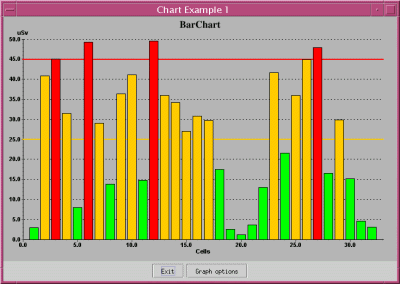
This application demonstrates how to the use JLChart to make bar chart.
|
![]() |
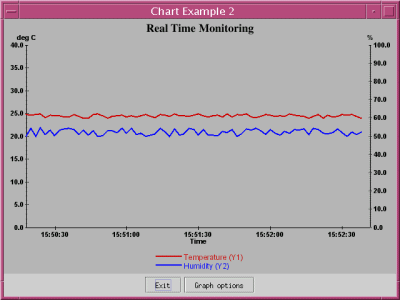
This application demonstrates how to the use JLChart to monitor some values in real time.
|
![]() |
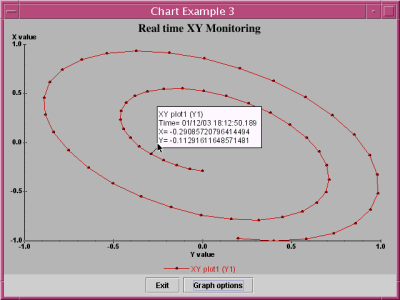
This application demonstrates how to the use JLChart to monitor some values in real time. The time axis
is not displayed (XY mode) but you can have the time stamp by clicking on a point.
|
![]() |
This application demonstrates how to the use JLChart to plot a random curve. It also shows how to cutstomize the value tooltip.
|
|
|||||||||
| PREV PACKAGE NEXT PACKAGE | FRAMES NO FRAMES | ||||||||